

Magick: A Game-Changing Visual AI Development Platform
Overview
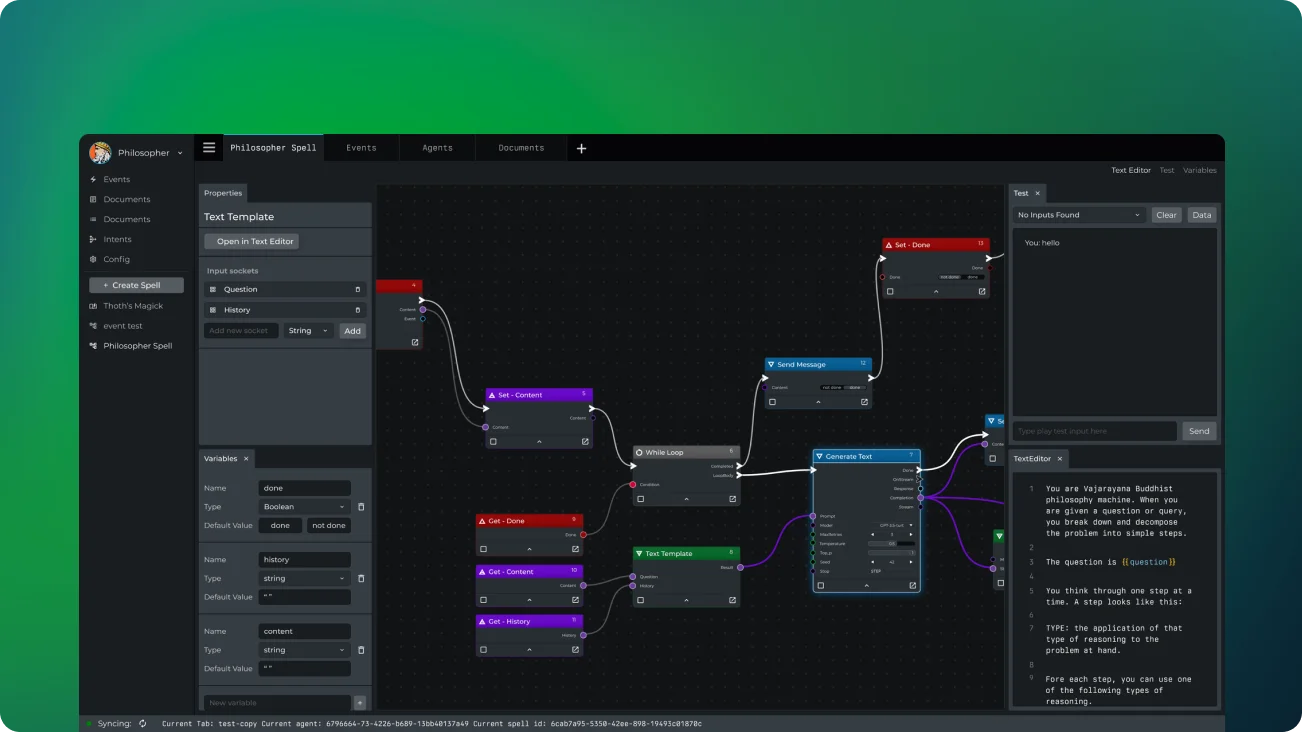
Magick is an innovative platform created for the next generation of AI developers. It offers a visual Artificial Intelligence Development Environment (AIDE) that allows users to design no-code data pipelines and multimodal agents effortlessly. Whether you’re building smart agents, chatbots, intricate reasoning models, or lifelike characters, Magick equips you with the necessary tools and templates to bring your ideas to fruition.
Main Features
- Real-Time Agents: Develop AI agents capable of taking independent actions, engaging with users and other agents across different channels, and maintaining a consistent memory and sense of identity.
- Social Integration: Connect seamlessly with popular platforms like Discord, Twitter, and Twilio. (Upcoming: Zoom, Google Meet, Reddit, and Slack connectors via plugins)
- Web Integration: Effortlessly search Google, Wikipedia, and the Semantic Web within the platform.
- Robust Tools: Utilize a comprehensive array of powerful tools, such as voice and image creation, as well as vector search capabilities.
- Graph-Based IDE: Take advantage of a strong, user-friendly interface designed for building complex data pipelines.
- Community Collaboration: Embed subgraphs in graphs and share them for swift, community-driven development.
Fundamental Concepts
- Spells: In Magick, a ‘spell’ refers to a data pipeline that moves data through various processes, or ‘nodes,’ via connections. Each spell is a combination of data, nodes, variables, and settings for a particular graph. Spells can be imported, exported, and shared in JSON format.
- Nodes: Nodes serve as the core components of Magick. They function as black boxes that accept data, transform it, and produce the output. The platform provides several types of nodes, such as:
- Input Nodes
- Prompt Templates
- Code Nodes
- Generator Nodes
- Wait For All Nodes
- And more!
- Inputs and Outputs: Nodes exchange data via inputs and outputs, represented visually as sockets. The color of the socket indicates the type of data it can handle, with gray as the default for ‘any’ type.
- Triggers: Triggers initiate asynchronous tasks within nodes. While some nodes can operate without triggers, most require them for execution. The ‘Wait For All’ node facilitates synchronization across multiple execution branches, enabling efficient parallel processing.
How to Build with Magick
- Create Spells: Use the composer window in the ‘Spells’ tab to design your AI pipelines.
- Add Nodes: Right-click within the composer or drag-and-drop from the ‘Nodes’ tab to include nodes in your spell.
- Connect Nodes: Link nodes to establish data flows and processing chains.
- Customize: Modify node settings and inputs to fine-tune the behavior of your AI system.
- Test and Iterate: Run your spells, analyze the results, and refine your design as necessary.
Advantages of Using Magick
- No-Code Platform: Build complex AI systems without needing advanced programming skills.
- Visual Interface: The intuitive graph-based interface makes it easy to design and modify AI pipelines.
- Flexibility: Integrate with various services and combine multiple AI functionalities in one unified platform.
- Rapid Prototyping: Quickly prototype and iterate AI ideas using pre-built nodes and templates.
- Community Collaboration: Share spells and collaborate with others to accelerate development and innovation.
Final Thoughts
Magick empowers both beginners and experienced AI developers to create advanced AI systems without the need for extensive coding. Its visual approach to AI development makes the technology accessible to a wider audience while providing the power and flexibility needed for complex projects. Whether you’re creating a simple chatbot or a sophisticated AI agent, Magick offers the environment and tools to bring your vision to reality.